Showing posts with label skype supernode. Show all posts

Friday, June 03, 2011

How Not To Be A Skype / Microsoft Supernode, Updated

How Not To Be A Skype / Microsoft Supernode http://snapvoip.blogspot.com/
We have updated one of our favorite posts;  "How to be or not to be a skype supernode?" has been given a long due update to reflect the Skype 3.0 or newer capability to disable the supernode capability. You still need to go about hacking the registry.  It is simple though. Follow the link to get information as how to change your registry.

How to be or not to be a skype supernode?

Friday, April 01, 2011

Skype Outages And MAC Client Woes!

Skype http://snapvoip.blogspot.com/
Yesterday I watched a video (See Below) interview of a Game developer CEO, Jason Asbahr from Montrous . It was all about why the game developers dropped Skype for MAC 5.0 and went back to Skype for MAC 2.8. Since I use my Skype mostly on PC's and Mobile phones, I have not experienced the problem nor I knew what the real problem was. Until I read VoIP Watch that is.
The MAC client problem seem to lead to an departed exec who could not get MAC right and wanted Skype for MAC to be like windows client. Well now you know where that went. I hope Skype will come up with a new client. 'Cos I will be ditching my windows / Linux note boot to a MACbook pro with MAC OS X and windows. The current notebook will stay on my desk and run Linux only.

Then there was signing in and call receiving problems on 30th. I was not very happy but Google Voice was there to save the day, It is not as big as the Supernode Crash. In any case I stopped being a Skype supernode long time ago, ever since I started paying.

Wednesday, December 29, 2010

Skype Supernode Outage Post-Mortem, Mega- Supernodes Helped

#Skype Outage Post-Mortem #Mega-Supernodes helped http://snapvoip.blogspot.com/
The massive Skype failure, and the root causes have been explained by the Skype CIO on their blog. Yet I am to read a complete explanation of supernode operations. Basically Skype is running their business on the back of the users, making them supernodes, whether they like it not. I certainly did not like being a supernode a few years ago and followed Fermilab Skype usage policy, not to become a supernode and stay within the Skype EULA. It was written for older operating system and oldervesion of Skype but it is so simple, any OS or Any Skype version should work. But it is up to you to decide to become a Skype Supernode or not by following  How to be or not to be a skype supernode!

Getting back to the Skype outage, the culprit seem to be Skype client 5.0.0.152 version. These clients crashed when a bunch of support servers got overloaded. All other clients were fine, including version 4.0 and newer 5.0 versions. But it seems that about 50% of Skype users were using .152. So with this many users crashing, so did the number of supernodes, which were responsible for establishing and maintaining connections in the Skype P2P network. About 30% of supernodes were knocked off and this accounted for bringing the Skype down. The other factor was, this many .152 clients restarting their Skype clients at the same time, more or less, overloading many other support servers. Basically;
Regrettably, as a result of the confluence of events – server overload, a bug in Skype for Windows clients (version 5.0.0.152), and the decline in available supernodes – Skype’s functionality became unavailable to many of our users for approximately 24 hours.
For it's credit, Skype describes how it recovered from the failure and how Mega-Supernodes launched to recover from supernode failure helped. But now that we know Skype can do manage to run Mega-Supernodes, hope it will keep them running all over the world and save users and their networks from overloading. Otherwise people will keep on Uninstalling Skype and finding other methods to communicate.
skype via twitter

Monday, December 27, 2010

Patent Law Suit Against Skype.

#Patent #LawSuit Against #Skype http://snapvoip.blogspot.com/
Just as Skype is picking up pieces from the recent massive Skype service outage, (Perhaps leading more people are looking to uninstall Skype, what the use of it if you could not send that lovely X-MAS message.), a company Gradient Enterprises, known to be a patent troll has filled a patent infringing suit against Skype in US courts.
The trolls are basically telling that they invented the network monitoring to which USPTO in it's wisdom granted the patent this year (the patent was filed in 2004). The U.S. patent no. 7,669,207, “METHOD FOR DETECTING, REPORTING AND RESPONDING TO NETWORK NODE-LEVEL EVENTS AND A SYSTEM THEREOF” Hopefully something good will come out of this law suite, for all of us.
The skype supernode network, which we have been advising and telling "how to be or not to be a Skype Supernode", so Skype need to be a supernode and get it's lawyer gears up and fight.
via TechCrunch

Saturday, October 14, 2006

How to be or not to be a skype supernode?

Update:
This post needed to be updated for a log time and I really need to do a new post about it. A comment by an Anonymous reader prompt me to search further and this is what I found;
*Skype now include the ability to disable supernode status and is described on Skype site instructing Universities how to disable supernode status from clients, http://www.skype.com/security/universities/
As we have mentioned before, if the computer is behind a NAT / Firewall or a combination, it is said to disable the supernode capabilities from the Skype client. It is also said to disable the supernode capabilities if the Skype is behind an HTTP or SOCKS5 proxy.
But the best and surefire way to disable it is a simple registry hack;

[HKEY_LOCAL_MACHINE\SOFTWARE\Policies\Skype\Phone]
"DisableSupernode"=dword:00000001
Open your regedit.exe and find the key  "HKEY_LOCAL_MACHINE\SOFTWARE\Policies\Skype\Phone" and create the DWORD, "DisableSupernode"=dword:00000001.
If you are not comfortable with hacking your registry, please cut and paste the following text into your notepad and sabe it as nosupernode.reg and double click on the saved file. It will update your registry. You will need to reboot the computer for the registry key change to take effect.
Windows Registry Editor Version 5.00
[HKEY_LOCAL_MACHINE\SOFTWARE\Policies\Skype]
[HKEY_LOCAL_MACHINE\SOFTWARE\Policies\Skype\Phone]
"DisableSupernode"=dword:00000001
Now you are sure that you will not be a supernode, no matter which network you are connected to. If you really want to be a supernode, change the DWORD to 00000000.
All complaints and concerns about Skype revolves around a PC using Skype becoming a super node. I have written about removing skype many a times because it seems hard for regular PC user.
I have been looking for information about operating Skype and yet not be a supernode. Not much information is available from skype itself and I cannot test any other way. Because Skype EULA specifically warns you against modifying or changing software and you must read it completely if you are a user of Skype. Also 4.1 explains the usage of your computer resources for skype network.
But there are other ways that you can still use Skype and not be a super node, while not violating Skype EULA. May be Network admins should adopt educating users or Skype should give an option of a user not becoming a supernode if he or she wishes to. One caveat in this method is that you have to trust the user to follow the procedures.
I found this information on Fermilab, High-Energy Physics, the science of matter, space and time research lab belonging to the US government.
The page describing Skype usage on the site states;
"Skype (www.skype.com) is a free P2P (peer to peer) application that provides free voice-over-IP communication over the Internet. Use of Skype on systems attached to the Laboratory network is not prohibited per se. However, Skype calls are routed across the Skype network through other Skype systems, called SuperNodes. Any system running the Skype application runs the risk of surreptitiously being elevated to the status of SuperNode. Computers with a fast connection to Internet (such as at Fermilab), combined with high speed CPU, are most likely to become SuperNodes. A SuperNode can generate a considerable amount of traffic by opening a large number of concurrent connections for off-site systems, even after the local user has discontinued using the Skype application on his system. Generally, the user needs to reboot his system to stop the SuperNode call-routing activity."
The article further states how you can limit skype and prevent it from becoming a supernode without having to resort to remove skype type action!
"Based on extended testing by the Fermilab Networking Section, a procedure has been developed to configure systems to run the Skype application, without becoming a Supernode. The testing has been conducted on a Windows XP system, however the general approach and configuration settings should be applicable to other platforms & operating systems. These procedures work with the current release of Skype. There is no guarantee these procedures will function properly in future releases."

1. For Windows XP Skype version 2.0.0.97 or greater should be installed. For Linux or MacOS the most current version of Skype should be used.
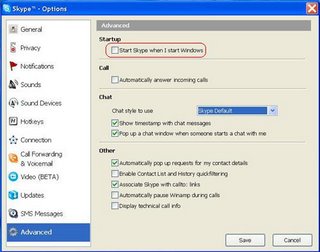
2. The user should configure his system such that Skype is not loaded at startup.
3. A software firewall must be installed and enabled.
* Windows XP firewall or Zone Alarm are examples of suitable firewalls for XP
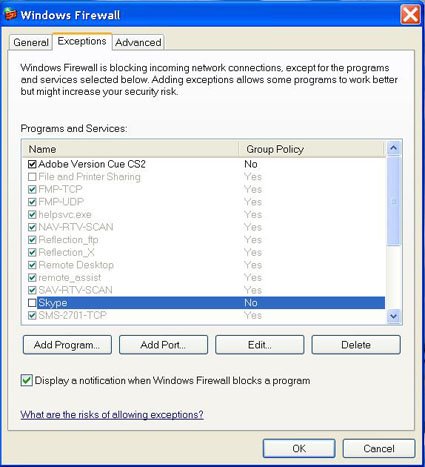
4. Exceptions for Skype must be disabled or deleted in the firewall setup.
* Windows XP Firewall: Settings>Control Panel>Windows Firewall>Exceptions

Detailed Configuration Instructions are located below under Instructions for Skype Configuration.

This configuration should prevent the local system from becoming a SuperNode.
One can also use Zonelab's Zonealarm to perform the same firewall configuration. Just prevent Skype from becoming a server.

Explanation for #2


Explanation for #4


Blog Widget by LinkWithin